Phase 1: The Scope (Clarify Requirements)
Never start coding immediately. In an interview, ambiguity is a trap. You must define the boundaries of the problem first.
Functional Requirements
- Infinite Scroll: Users see a continuous stream of photos.
- Engagement: Users can "Like" a photo.
- Metadata: Display author info, timestamp, and like counts.
Non-Functional Requirements (The "Senior" Traits)
- Performance: Must maintain 60fps scrolling, even with 1000+ items loaded.
- Network: Must work on unstable 3G connections.
- UX: No layout shifts (CLS) as images load.
- Responsiveness: Mobile-first design that adapts to desktop.
Phase 2: The API Contract
Defining the data structure early proves you understand how the frontend consumes backend services.
Pagination Strategy: Cursor vs. Offset
For a real-time feed, Offset Pagination (e.g., page=1, page=2) is dangerous. If a new photo is added while the user is on Page 1, the whole list shifts down. When the user requests Page 2, they might see the same photo again.
The Solution: Cursor-Based Pagination We use a pointer to the last item fetched. It is stable and performant.
1// GET /api/v1/feed?limit=10&cursor=dXNlXzEwMQ==
2
3interface FeedResponse {
4  data: FeedItem[];
5  meta: {
6    nextCursor: string; // The pointer for the next batch
7    hasMore: boolean;
8  };
9}
10
11interface FeedItem {
12  id: string;
13  url: string;
14  aspectRatio: number; // Critical for Layout Shift (CLS)
15  author: { id: string; username: string; avatarUrl: string };
16  likesCount: number;
17  hasUserLiked: boolean;
18}
19
20
Phase 3: High-Level Architecture
Before diving into code, sketch the data flow. This shows you understand infrastructure.
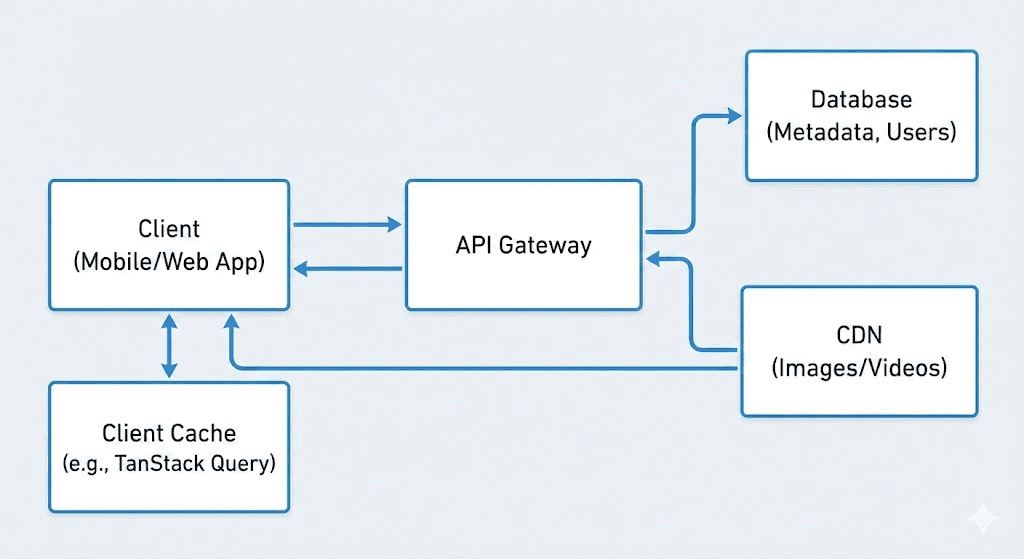
The Data Flow:
- Client: Initializes the feed request.
- API Gateway: Aggregates data (User profile + Photo metadata + Like status).
- CDN: Delivers the heavy assets (images/videos). The API only returns URLs, never the binary data.
- Client Cache: Stores the data (e.g., using TanStack Query) to allow instant navigation if the user leaves and returns to the feed.
Phase 4: Critical Technical Challenges (The Deep Dive)
This is the core of the interview. You must identify the hardest parts of the problem and solve them.
1. Infinite Scroll & Virtualization
Rendering 1,000 photos in the DOM will consume gigabytes of RAM and crash the browser.
- The Solution: Virtualization (Windowing).
- How it works: We only render the items currently visible in the viewport (plus a small buffer). As the user scrolls, we recycle the DOM nodes.
- Libraries:
react-windoworvirtuoso.
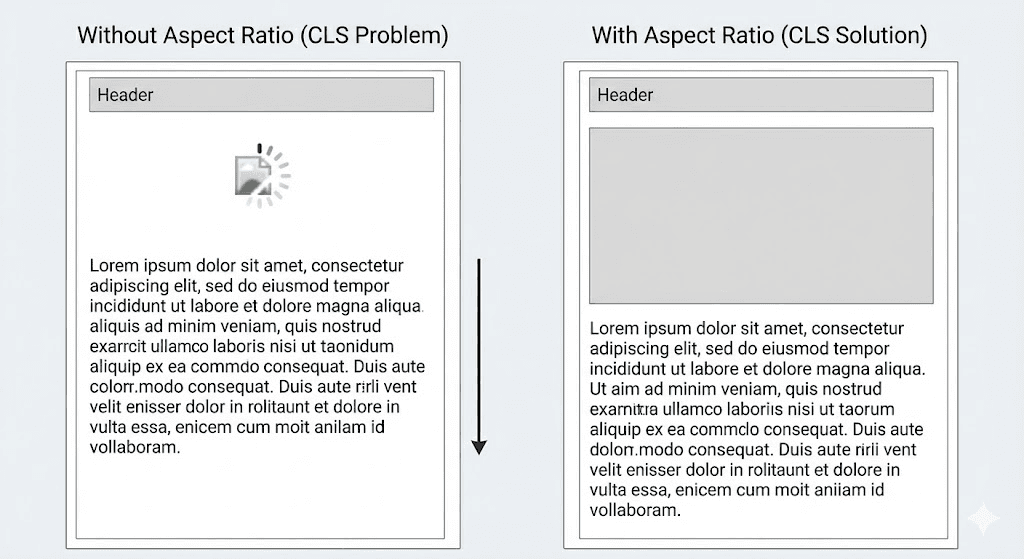
The image above demonstrates how virtualization works: only the items within the "Viewport" are rendered, while the remaining space is held by placeholders.
2. Eliminating Layout Shift (CLS)
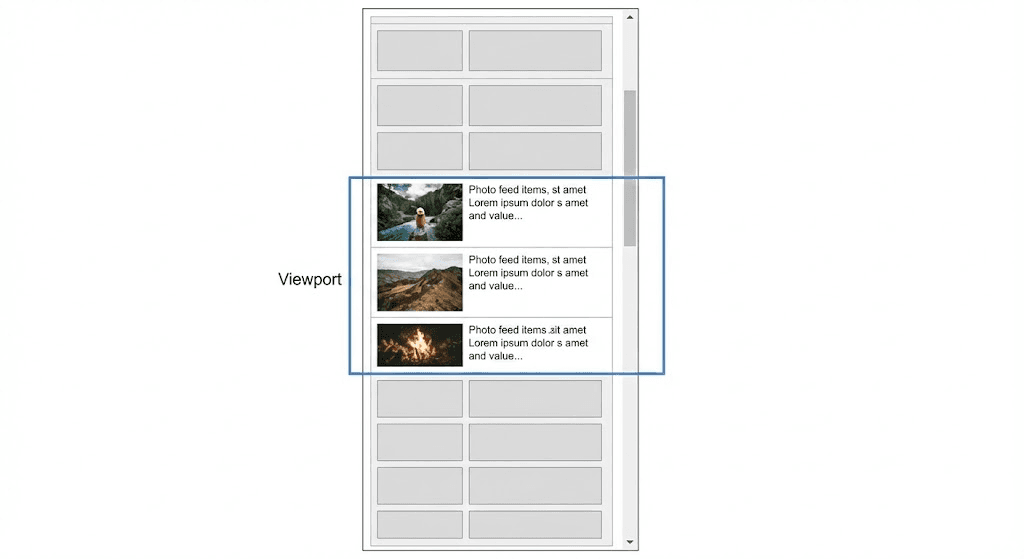
If we don't know an image's size before it loads, the text below it will "jump" when the image pops in. This destroys UX.
- The Solution: The API must return the
aspectRatio(e.g.,1.33). - Implementation: We render a placeholder
divwithpadding-bottom: ${100 / aspectRatio}%. This reserves the exact screen space before the network request for the image even starts.
3. Optimistic UI Updates
When a user taps "Like," waiting 500ms for a server response makes the app feel sluggish.
- The Solution: Optimistic Updates.
- Instant Feedback: Immediately turn the heart red in the local state.
- Background Request: Send the API call.
- Rollback: If the API fails (e.g., 500 error), revert the heart to white and show a toast notification ("Connection failed").
Phase 5: State Management (Normalization)
Should we store the feed as a giant nested array? No.
If the user "Alex" posts 5 photos in the feed, and then updates their avatar, we don't want to hunt down 5 different objects to update the avatar URL.
The Solution: Normalized State (Database-like structure in Redux/Cache)
1{
2  "entities": {
3    "photos": {
4      "p1": { "id": "p1", "authorId": "u1", "url": "..." },
5      "p2": { "id": "p2", "authorId": "u1", "url": "..." }
6    },
7    "users": {
8      "u1": { "id": "u1", "username": "alex", "avatar": "new_face.jpg" }
9    }
10  },
11  "feed": ["p1", "p2"] // List of IDs only
12}
13
14- Benefit: Update
users["u1"]once, and the entire UI updates automatically.
Phase 6: Trade-offs & Risks
A Senior Engineer knows that every solution has downsides. Acknowledging them shows maturity.
| Decision | Trade-off | Mitigation |
|---|---|---|
| Virtualization | "Ctrl+F" (Find in page) breaks because off-screen text isn't in the DOM. | Acceptable for image feeds; less acceptable for data tables. |
| Cursor Pagination | Users cannot "Jump to Page 10." | Standard UX for infinite feeds; users rarely jump pages. |
| Aggressive Pre-fetching | Wastes user data if they stop scrolling. | Check navigator.connection.saveData before pre-fetching. |
Final Summary
To ace this interview question, remember the "S.A.D." framework:
- Scope the problem (Mobile first? 3G?).
- Architecture the solution (CDN, Caching, API).
- Deep Dive into performance (Virtualization, CLS, Optimistic UI).